2 minutes
Start off a tmux environment
The following commands create a tmux environment with specific windows and panes.
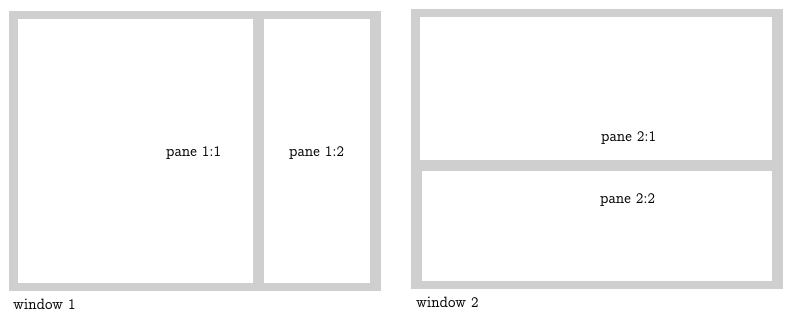
By way of demonstration, my environment will create a window for music, and a second window, split in two panes, for podcasts. I use cmus for music, and the command line version of vlc for podcasts.
Description
First, check if the session exists already
tmux has-session -t AudiophileIf not, then execute something; otherwise exit and (probably) attach the session.
if [ $? != 0 ]
then
 <execute something>
fi
The first command creates a new session called ‘Audiophile’, and immediately names the only existing window as ‘Music’.
tmux new-session -s Audiophile -n Music -dIn the same session/window (since there is only one), call cmus, and divide the screen. The size of the split is defined to 70 lines. Once divided, return the selection to the main screen.
 tmux send-keys -t Audiophile 'cmus' C-m
 tmux split-window -v -p 70 -t Audiophile
 tmux select-layout -t Audiophile main-vertical
Without moving the selection of pane, go to a specific folder in the smaller one.
tmux send-keys -t Audiophile:1.2 'cd <some-folder>; clear' C-mNow create a new window named ‘Podcasts’.
tmux new-window -n Podcasts -t AudiophileLikewise the first window, create a second pane, go the podcast folder, and display its content. In the main pane, call podui, which is an alias for the command line version of vlc.
podui=‘/Applications/VLC.app/Contents/MacOS/VLC –intf ncurses .’
tmux send-keys -t Audiophile:2 'cd <pod-folder>; clear; ls -lh' C-m
tmux split-window -v -t Audiophile:2
tmux select-layout -t Audiophile:2 main-horizontal
tmux send-keys -t Audiophile:2.2 'podui' C-m
Once the second window is made, return to the first window and attach to the session. This will exit the script.
tmux select-window -t Audiophile:1
tmux attach -t Audiophile
As aforementioned, the else section of the condition will immediately attach to the session.
tmux attach -t AudiophileScript
tmux has-session -t Audiophile
if [ $? != 0 ]
then
 tmux new-session -s Audiophile -n Music -d
 tmux send-keys -t Audiophile 'cmus' C-m
 tmux split-window -v -p 70 -t Audiophile
 tmux select-layout -t Audiophile main-vertical
 tmux send-keys -t Audiophile:1.2 'cd <some-folder>; clear' C-m
 tmux new-window -n Podcasts -t Audiophile
 tmux send-keys -t Audiophile:2 'cd <pod-folder>; clear; ls -lh' C-m
 tmux split-window -v -t Audiophile:2
 tmux select-layout -t Audiophile:2 main-horizontal
 tmux send-keys -t Audiophile:2.2 'podui' C-m
 tmux select-window -t Audiophile:1
 tmux attach -t Audiophile
fi
tmux attach -t Audiophile
The script might be called from an alias in a new terminal session (outside tmux). For example:
$: tmxenv
where,
tmxenv='sh <folder-with-script>/tmux_env_maker'